1. What is "Cross-Exchange Multi-Account Ordering"
"Cross-Exchange Multi-Account Ordering" is a cross-platform synchronous trading core designed for professional traders. It breaks the operational boundaries of a single exchange, allowing users to link multiple exchanges and multiple API accounts to complete order placement, order cancellation, and position management from a single trading entry point.
For example, users can take OKX as the main ordering entrance, and after completing an order confirmation in AiCoin, synchronize and link to accounts on platforms such as Binance, Bybit, Bitget, Gate, HTX to execute corresponding trades. Whether it’s multi-platform synchronous following, risk hedging, or unified management of positions across different exchanges, it can reduce the operational costs of frequently switching platforms and re-entering orders. AiCoin helps professional users build a more efficient multi-exchange asset management matrix through cross-platform trading pair mapping, API group management, target account verification, and execution result aggregation.
In simple terms:
- Regular Multi-Account Ordering: Solves the issue of "synchronizing multiple accounts within the same exchange."
- Cross-Exchange Multi-Account Ordering: Solves the issue of "synchronized trading across multiple exchanges and multiple API accounts." It not only handles account grouping but also intelligently adapts to differences in trading pair mapping, quantity units, minimum order volume, price precision, and margin models between different exchanges.

2. Functional Advantages and Applicable Audience
1. Core Advantages
- Eliminate cross-platform operational friction:
No need to switch back and forth between multiple exchanges; one order panel can link multiple platform accounts.
- Streamline multi-exchange execution links
Supports selecting API groups by exchange, automatically matching corresponding trading pairs, turning synchronous order placement from “manual copying” into “one confirmation.”
- Asset management matrix for professional users
Suitable for scenarios such as multi-platform layout, risk hedging, synchronous following, and cross-exchange position management, allowing different platform accounts to execute collaboratively.
- More transparent execution process
Displays execution API, cross-exchange trading pairs, order quantity, and excluded items before confirmation; shows success, failure, or processing status by account after placing the order.
- Supports follow-up unified management
Provides cross-exchange order and cross-exchange position views for batch order cancellation and synchronous position closing across exchanges.
2. Applicable Audience
- Multi-platform professional traders: Users who manage multiple exchange accounts and need efficient fund or permission isolation.
- Hedging and following users: Players who need to execute strategies synchronously across different platforms, conduct risk hedging, or balance positions across exchanges.
- Quantitative executors pursuing extreme efficiency: Experienced users who need to respond quickly to market conditions and access multiple liquidity pools through a single command.
3. Functional Operation Guide and Case Demonstration
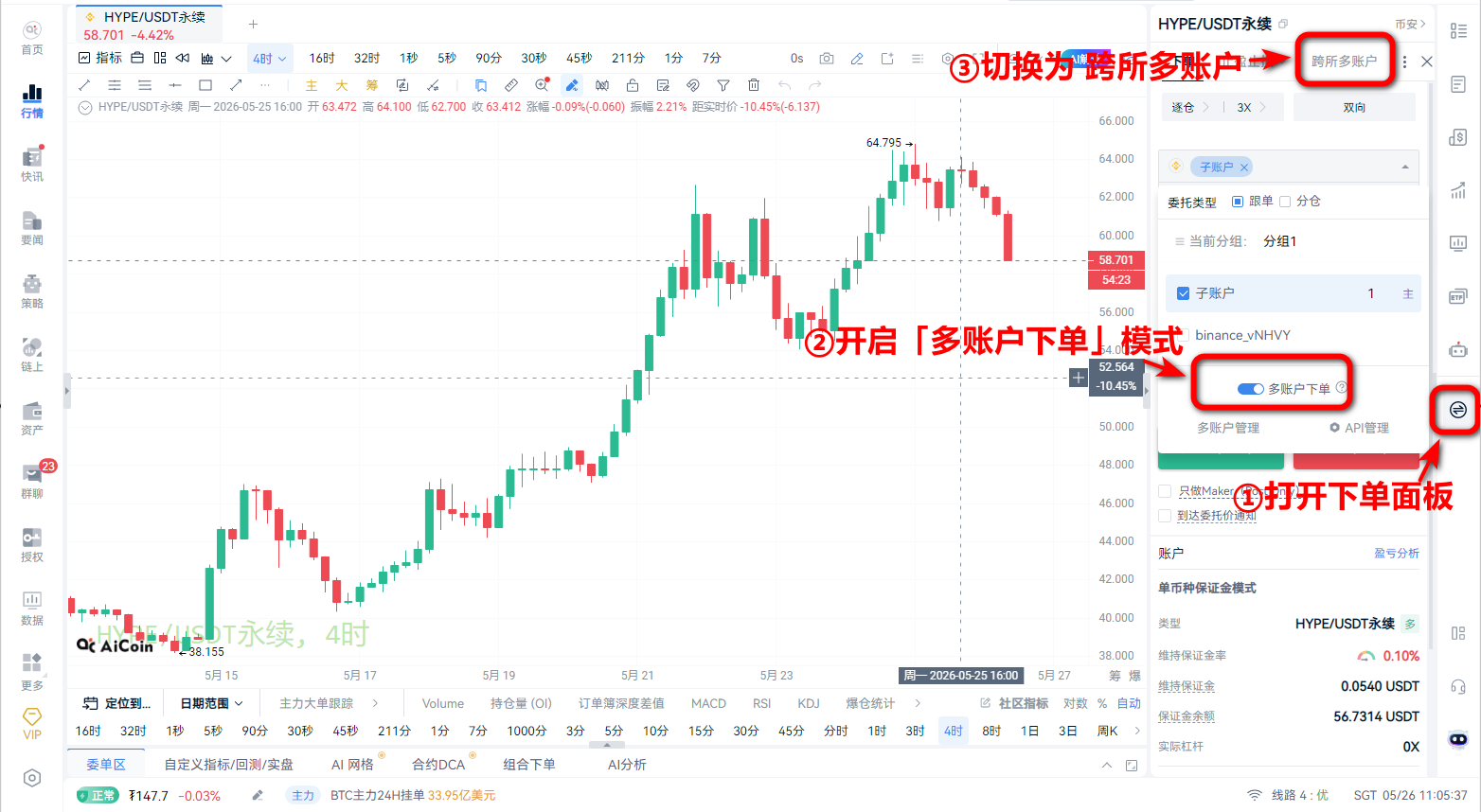
1. Access Method:
1. Open the trading page.
2. Turn on "Multi-Account Ordering" mode
3. Switch the top of the order area to Cross-Exchange Multi-Account.
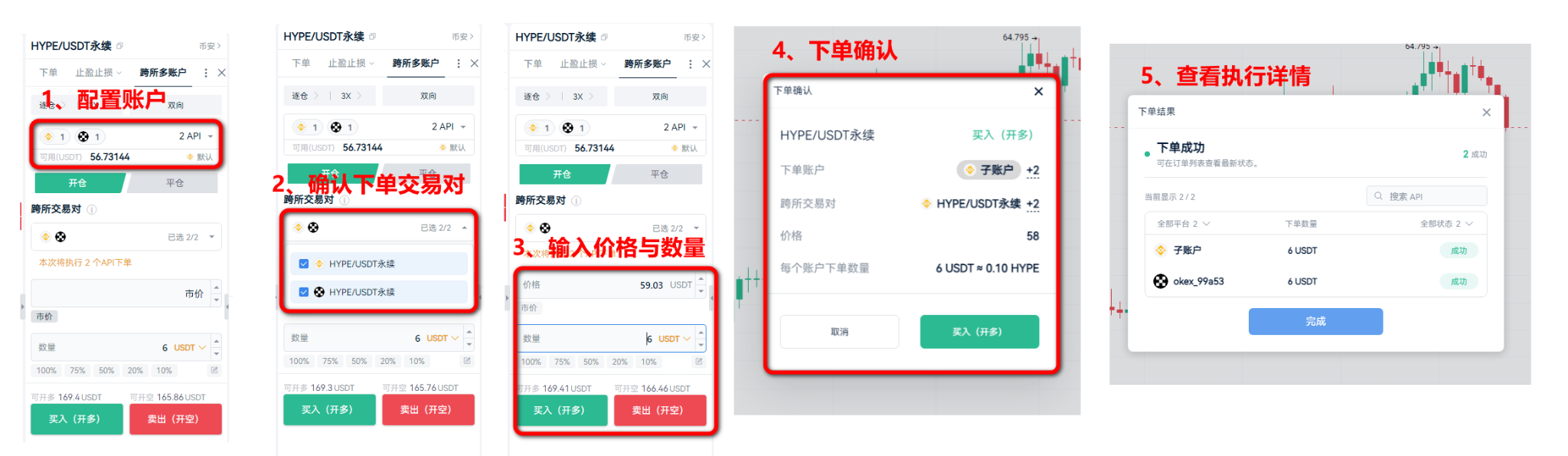
2. Case: Synchronously enter long positions in HYPE/USDT perpetual contract trading pairs on Binance and OKX
1. Configure accounts: Click on the account area of the panel, and check the desired exchanges and corresponding API groups (e.g., Binance Group 1 + OKX Default).
2. Confirm the trading pair: The system automatically matches the corresponding trading pairs for each platform. If execution on a certain platform is not needed, uncheck it.
3. Set parameters: Enter price and quantity. Note: The quantity entered here is the “single API execution quantity.”
4. Submit and confirm: After clicking buy (go long), the system will pop up a confirmation box for the execution range; verify accuracy and submit.
5. Result details: After submission, view the execution details of each API (success, failure, processing) through the "result details pop-up window."
 4. How to Set Up Cross-Exchange Accounts
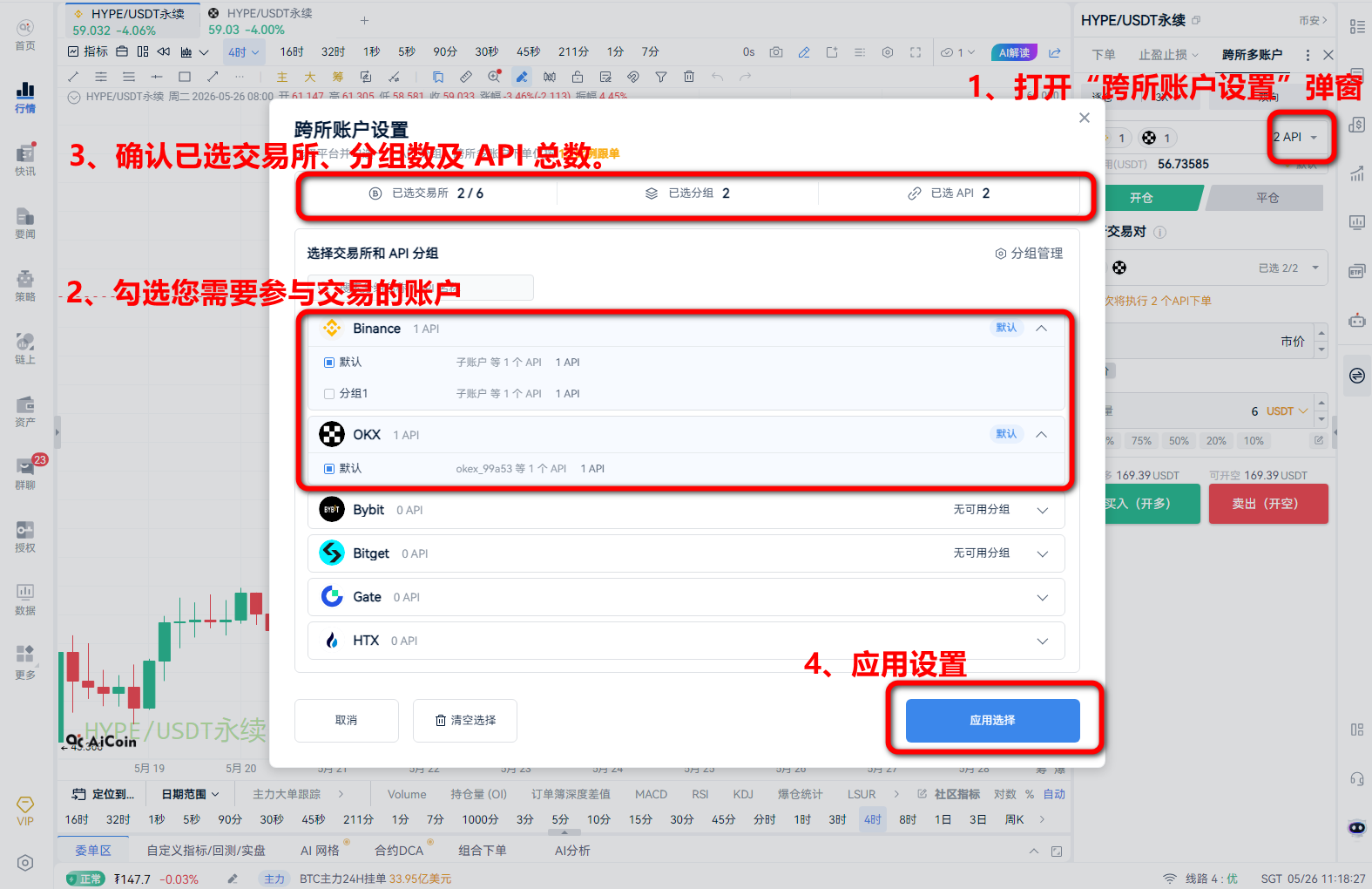
Cross-exchange account settings determine: "Which exchanges and which APIs will participate in execution."
Click on the account area of the main panel to open the "Cross-Exchange Account Settings" pop-up:
1. Select platforms: Check the exchanges you need to participate in trading (e.g., Binance, OKX, etc.).
2. Allocate API groups: For each selected platform, check the corresponding API group.
3. Confirm scale: View the statistics bar at the top of the pop-up to confirm the selected exchanges, group quantity, and total API number.
4. Apply settings: Click "Apply," and the main panel will automatically refresh available funds, open position limits, and trading pair mappings.
5. Frequently Asked Questions (FAQ)
Q: What should I do if the leverage and margin models of different platforms are inconsistent?
A: Each API will execute according to its preset mode (leverage/position model). If the execution results do not meet expectations, please check the API configurations of the respective platforms.
Q: Does the cross-exchange ordering panel support switching trading pairs?
A: It does not support this. The panel's subject is fixed to the trading pair on the current trading page to ensure that you remain focused and efficient while making cross-exchange decisions.
Q: What should I do if I see the message "No available groups"?
A: Please click the "Group Management" entry in the pop-up, go to the API group management interface first to create and maintain your API groups, and then return to check them.
Q: Does cross-exchange ordering support take profit and stop loss?
A: The current version focuses on enhancing the efficiency of synchronous order placement and does not support functions like fragmented warehouse, take profit, or stop loss strategies.
Q: Why did some accounts not place orders even though I set up multiple accounts?
A: The system will automatically conduct pre-validation. If account authorization is invalid, the trading pair is not supported, or mapping is missing, the system will automatically exclude these accounts. You can view the specific exclusion reasons in the result details pop-up.
免责声明:本文章仅代表作者个人观点,不代表本平台的立场和观点。本文章仅供信息分享,不构成对任何人的任何投资建议。用户与作者之间的任何争议,与本平台无关。如网页中刊载的文章或图片涉及侵权,请提供相关的权利证明和身份证明发送邮件到support@aicoin.com,本平台相关工作人员将会进行核查。