Original Title: "10 Claude Code Tips I Wish I Knew Sooner"
Original Author: Iron Hammer, AI Analyst
Here are some Claude code tips that I have often lamented about wishing I had known earlier over the past six months.
They save me a lot of time and help me get into a smooth state while writing code and content.
The article is divided into three parts:
1. Three Launching Methods
2. Tips for Using While Running
3. Using Support Software to Solve Human-Machine Collaboration Efficiency Issues
All of this is to: allow you to focus more on programming and other activities at hand.
I wish someone had sent me this tutorial a few months ago, to help me avoid detours and achieve smoothness:
1. Save this guide and spend 30 minutes this weekend mastering Claude code techniques.
2. Send it to anyone who asks you, "I find Claude code difficult, but I have never tried."
Alright, let’s start with the simplest way to launch (you read that right, launching has its tricks)
The Three Ways to Launch Claude
Simple Launch
Launching Claude is a very simple thing, simple in the command line
However, for friends who are not fond of command line tools, Claude code actually has a visual interface.
How to achieve this?
On this website: https://claude.com/download, below Claude Desktop, follow the steps below to obtain a visual version of Claude.
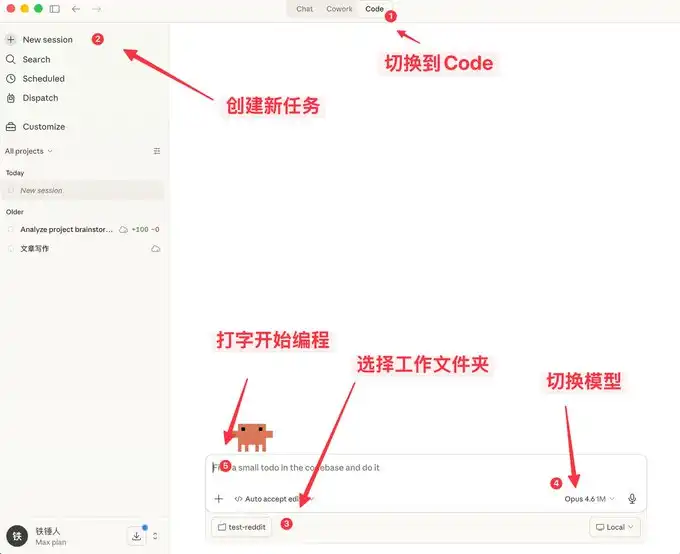
Here you can not only chat but also has many features similar to OpenClaw.
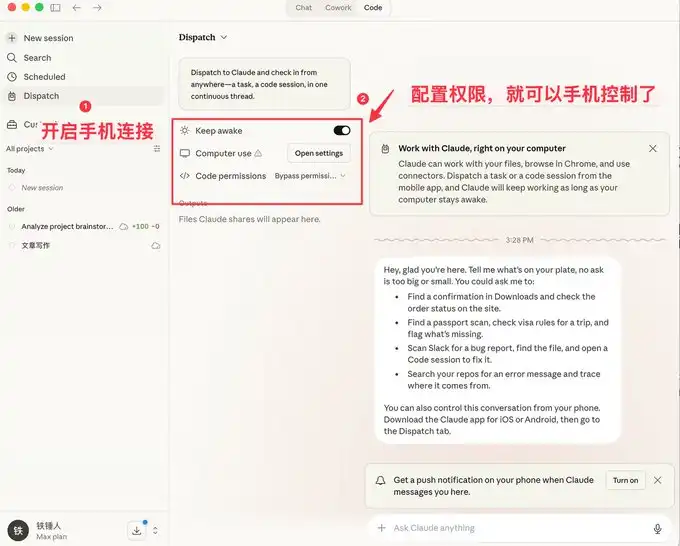
The visual interface is more user-friendly for the average person, but programmers prefer the command line method of launching.
Here are a few commands to speed up launching.
Command Line Launch
Launching from Specific History
During our use of Claude code, we often encounter situations that require a restart, and every time we restart, we need to restore the previous context:
Previously, I always used:
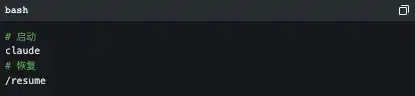
But the official actually provided many good startup commands:
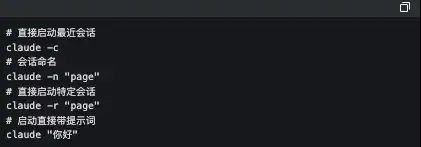
The one I frequently use is cluade -c, this short command has saved me a lot of life.
-p Start in an Automated Manner
Claude Code can be launched without a UI, simply use the command below:

It is worth noting that if you want to use the local subscription Token to automate tasks, currently, this is the only way to do it.
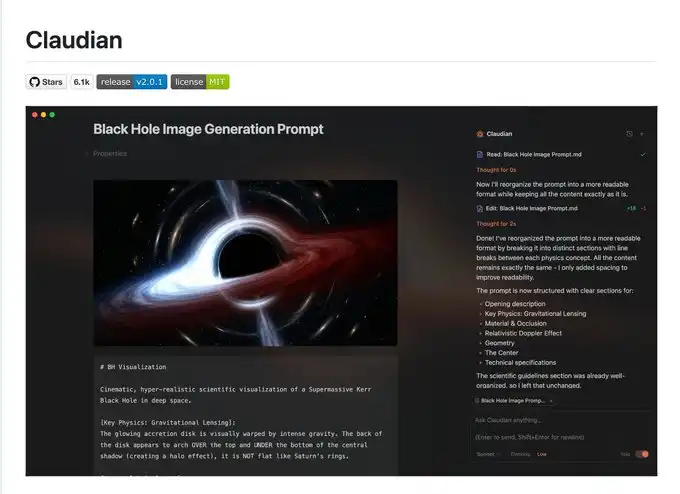
Below is the famous Obsidian + Claude Code tool, which has created an SDK to use the local subscription Token this way.
I admit what I said earlier might be a bit complex, now let’s talk about a few simple commands to use during the process.
Three Must-Know Tips While Running Claude Code
Gracefully Terminate and Roll Back Tasks
When first using claude code, everyone still likes to use Ctrl+C to close the current conversation, but it turns out that it directly shuts down Claude. The correct approach is to press the Ese key once, which can instantly interrupt the conversation and avoid things from getting worse.
If Claude suddenly loses its mind, we can press Ese+Ese twice, and a list will pop up:
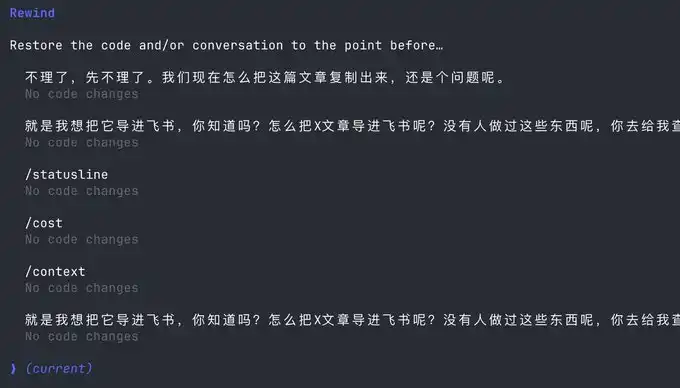
You can use this feature to return to any checkpoint, avoiding Claude code from messing up the code.
Execute Commands Without Leaving Claude
Sometimes we want to run a test command ourselves, but in order to keep the current Claude running, we have to open another command window.
Actually, we can use the ! syntax:

Context Management
As the conversation continues, the chat records we accumulate increase, and the tokens consumed each time also increase, at this point Claude code will run slower and slower.
You have two options, either open a new window or use /clear command
A simple command can clean up useless context, similar to closing 20 Chrome tabs at once.
But what if I don’t want to clear this context? Use /compact to compress it.
It's like giving Claude a Red Bull to boost its alertness.
I hope the little tips above can help you use Claude code more smoothly.
But that is far from enough, as Claude code is a command-line tool, no matter how many commands you learn, it is still a mental burden.
Fortunately, the community has produced quite a few supportive software to address the following pain points:
1. There is no mature prompt word methodology, leading to low programming efficiency.
2. Humans type relatively slowly, resulting in low input prompt efficiency.
3. In multitasking processes, humans become fragmented, unable to improve productivity.
If any of the above is your pain point, please keep reading.
Using Support Software to Solve Human-Machine Collaboration Issues
Now, we are slowly realizing that humans are starting to lag behind machines, which has led to the community developing a series of software to solve this problem.
First, we need a mature programming methodology:
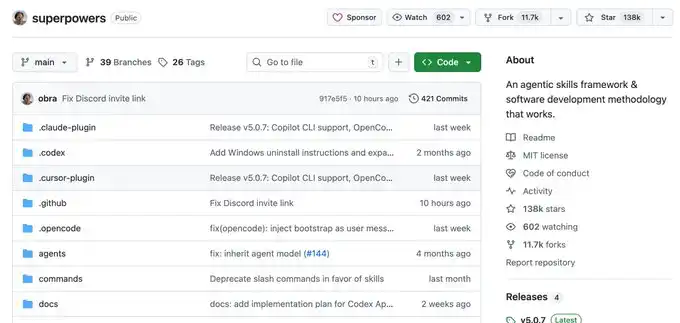
Superpowers
Ordinary people usually have no rules when Vibecoding, just do whatever comes to mind; this Skills was summarized by an experienced programmer as a programming workflow.
He packaged top-notch software engineering best practices into one-click Skills. From demand sorting, Spec confirmation, detailed planning, to TDD testing driver + automated Code Review, it enforces a structured workflow throughout, allowing AI to output high-quality, maintainable code like a mature engineering team, significantly increasing the one-pass rate, no more repeated fire-fighting.
This project has already garnered 138k Stars, you can look into it; I won’t elaborate further.
When you have a mature programming Skills, you will find that it requires you to input information frequently, at which point you will realize that typing speed becomes your efficiency bottleneck.
You might be thinking, Is there any software that allows you to dictate quietly in the office and converts it to text, with particularly accurate Chinese and English recognition?
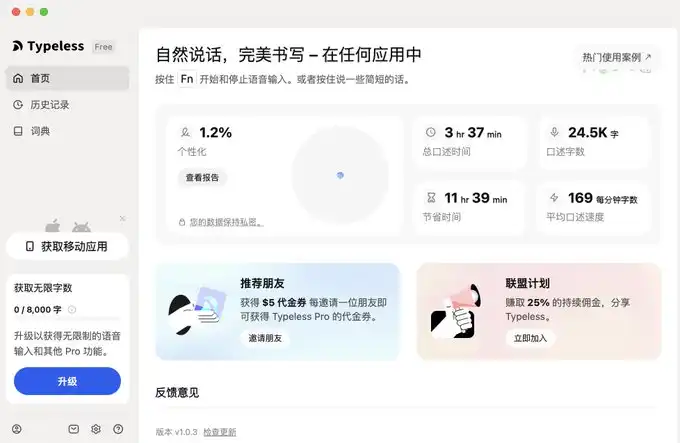
Yes, there is, and there are many, but I will only recommend two, Typeless and Doubao Input Method.
Voice Input Software
The advantage of Doubao Input Method is that it is fast, and its Chinese and English recognition is quite good, most importantly, it is free. It’s a bit like the Android system, and I am using it as well.
However, Typeless, besides requiring a fee, has few drawbacks, but you can try it out.
I will provide the links below.
Typeless is recommended with affiliate: https://www.typeless.com/?via=lxfater
Doubao Input Method is still in the testing phase; you can find the installation package by searching.
Once we start using speech input, we can provide more context to Claude code, and the pass rate will keep rising; at that time, the efficiency bottleneck will be the running time of Claude code.
We can run multiple instances of Claude code simultaneously, at which point our bottleneck is the issue of human multitasking and losing context.
Solve Your Attention Switching Issues
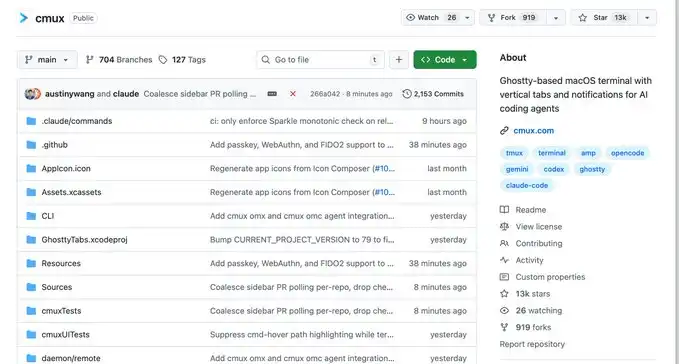
First, I recommend a software called Cmux:
It is a macOS native terminal newly built on Ghostty, specially designed to run multiple coding agents at the same time: vertical tabs + smart sidebar, flexible splitting, smart notification highlighting, built-in browser split screen + Socket API.
This is an open-source project: https://github.com/manaflow-ai/cmux
My favorite is the split-screen feature, but once it’s split, there’s the issue of not knowing which window completed the task.
Fortunately, this software will directly highlight a specific terminal area, helping you switch to the corresponding window in time.
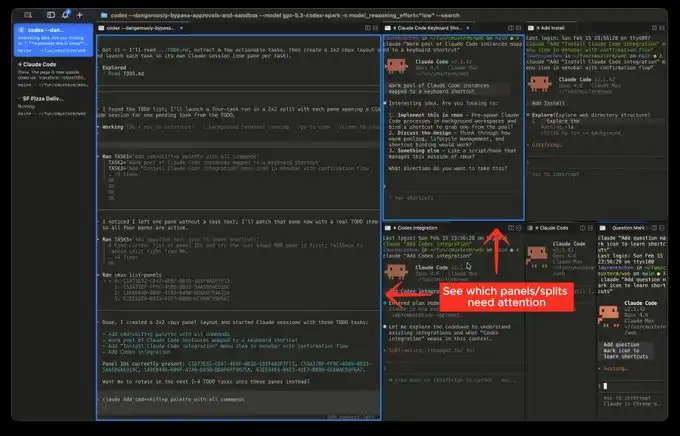
Official Website Image
But the next software I am introducing will make this switching extremely smooth:
This is a relatively popular product recently, called Vibe Island
Isn’t the UI beautiful, but the most impressive part of this product is that it supports switching among many different tools
and each switch will automatically invoke and focus the window of the current APP, then you can directly input.
Theoretically, as long as you switch quickly enough and open enough windows, it will continuously push the windows that need processing to your forefront. You feel like you are handling an assembly line.
Finally
I hope this content has been helpful to you; this time it is more beginner-friendly, but actually, for programmers, it is common sense.
Still, I hope it can help you; if you feel this content is helpful!
免责声明:本文章仅代表作者个人观点,不代表本平台的立场和观点。本文章仅供信息分享,不构成对任何人的任何投资建议。用户与作者之间的任何争议,与本平台无关。如网页中刊载的文章或图片涉及侵权,请提供相关的权利证明和身份证明发送邮件到support@aicoin.com,本平台相关工作人员将会进行核查。


