When AI Has the “Hands” and “Eyes” of a Web3 Wallet
In the world of Web3, we interact with various DApps every day, conducting transactions, staking, and lending. These operations offer unprecedented freedom but also come with complexity and time costs. Imagine if there was an intelligent AI Agent that could monitor the market in real time, discover trading opportunities, and complete on-chain operations in milliseconds, what an experience that would be?
Now, this is no longer science fiction! The comprehensive opening of OKX OnchainOS allows the AI Agent to truly possess the “hands” and “eyes” of a Web3 wallet. It not only opens the underlying capabilities of the OKX wallet and OKX DEX but natively supports the free invocation of AI Agents. Today, we will analyze a practical example of how OKX OnchainOS enables AI to help you achieve intelligent and efficient on-chain automated trading!
1. Practical Demonstration: How AI Agents Help You "Monitor the Market" and "Buy the Dips"
Suppose you are a busy Web3 player who sees potential in a certain Meme coin on the Solana chain but does not have time to monitor the market 24 hours a day. You want the AI Agent to automatically buy when the price of this Meme coin drops to a certain psychological price. OKX OnchainOS can perfectly realize this scenario.
AI Agent Automated Trading Process Simulation:
- AI Agent Receives Instructions: You tell the AI Agent, “When the price of Meme Coin A drops below 0.001 SOL, automatically buy using 1 SOL from my wallet.”
- AI Agent Monitors in Real Time: The AI Agent continuously obtains the real-time quote of Meme Coin A on the DEX through the API provided by OKX OnchainOS.
- AI Agent Triggers Conditions: When the price of Meme Coin A truly falls below 0.001 SOL, the AI Agent immediately initiates the trading process.
- AI Agent Checks Balance: The AI Agent calls the Wallet API of OnchainOS to check if there are enough SOL in your wallet to execute the trade.
- AI Agent Gets the Optimal Quote: The AI Agent calls the DEX API of OnchainOS to search for the optimal route and quote for purchasing Meme Coin A with 1 SOL across multiple DEXs.
- AI Agent Initiates the Trade: The AI Agent calls the Wallet API of OnchainOS to automatically construct and sign an on-chain transaction, exchanging 1 SOL for Meme Coin A.
- Trade Completion Notification: After the transaction is successful, the AI Agent will notify you immediately and update your asset portfolio.
Throughout the process, you do not need to operate manually, as the AI Agent, empowered by OnchainOS, autonomously completes the entire flow from monitoring to execution. This is the charm of AI native to Web3!
2. Technical Breakdown: Core API Calls of OKX OnchainOS
Behind the practical scenario above is the powerful and open API interface supported by OKX OnchainOS. For developers and advanced users, understanding the logical calls of these APIs is crucial.
1. DEX API Call: Obtaining Optimal Quotes and Trading Routes
Before making a trade, the AI Agent needs to obtain the most accurate and optimal trading quotes. OKX OnchainOS has opened up the underlying API of OKX DEX, and the core function of which is the get_quote feature.
get_quote (Get Quote):
- Function: Allows the AI Agent to query real-time quotes of specified trading pairs (e.g., SOL/Meme Coin A) across multiple DEXs and returns the optimal trading route, slippage, and estimated trading volume.
- Calling Logic: The AI Agent sends a request to OnchainOS, including parameters such as trading pair, trade quantity, etc. OnchainOS aggregates data from over 20 DEXs on the chain and returns the optimal trading plan.
- Advantages: Ensures that the AI Agent can obtain the best execution price for every trade, avoiding unnecessary losses.
2. Wallet API Call: Balance Inquiry and On-chain Transfer
The AI Agent needs to manage the wallet like a human, including checking balances and initiating on-chain trades. OKX OnchainOS opened up the underlying API of OKX Wallet, empowering the AI Agent with these core capabilities.
get_balance (Check Balance):
- Function: Allows the AI Agent to check the token balance of a specified address on a particular chain.
- Calling Logic: The AI Agent sends a request including the wallet address and token information. OnchainOS returns real-time balance data.
- Advantages: Ensures that the AI Agent can accurately determine whether there are sufficient funds in the wallet before executing a trade.
send_transaction (Send Transaction):
- Function: Allows the AI Agent to construct, sign, and broadcast on-chain transactions (such as token swaps, transfers, etc.).
- Calling Logic: The AI Agent prepares the transaction parameters (such as recipient address, amount, Gas fee, etc.), and OnchainOS is responsible for signing and broadcasting (Note: for security reasons, user authorization or preset whitelist is typically required).
- Advantages: Achieves the automated execution capability of the AI Agent, transforming trading instructions into actual on-chain operations.
3. MCP Protocol Support: The “Plug and Play” of AI Agents
OKX OnchainOS natively supports the Model Context Protocol (MCP). This means AI Agents like Manus can seamlessly access OnchainOS and directly call its open APIs. The MCP protocol provides a standardized interface and context management mechanism for AI Agents, allowing them to understand user intentions more intelligently and interact efficiently with OnchainOS.
- AI Agent Free Invocation: The AI Agent can freely call various functions of OnchainOS according to user instructions or preset strategies.
- Multimodal Interaction: In the future, AI Agents can even understand users' complex instructions through natural language and translate them into on-chain operations.
3. OKX OnchainOS: Specific Access Steps, Humanities Students Can Easily Access
In just five steps, you can integrate OKX OnchainOS's powerful wallet, trading, market, payment, and DApp capabilities into OpenClaw, covering over 60 mainstream public chains and 500+ DEX liquidity, allowing the AI Agent to autonomously execute trades, gain market insights, address research, and perform on-chain payments, achieving a truly AI trading experience.
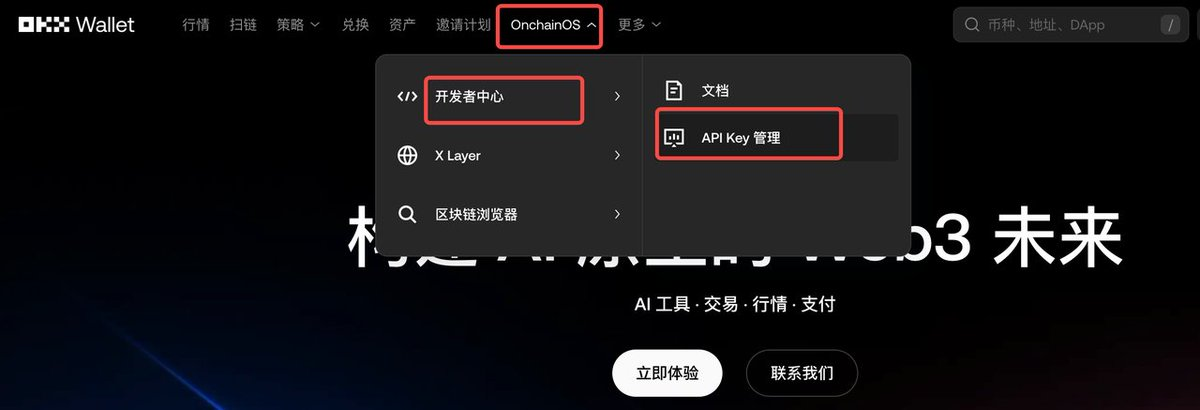
Step One:
Click to access the OKX wallet homepage, click OnchainOS - Developer Center - API Key Management
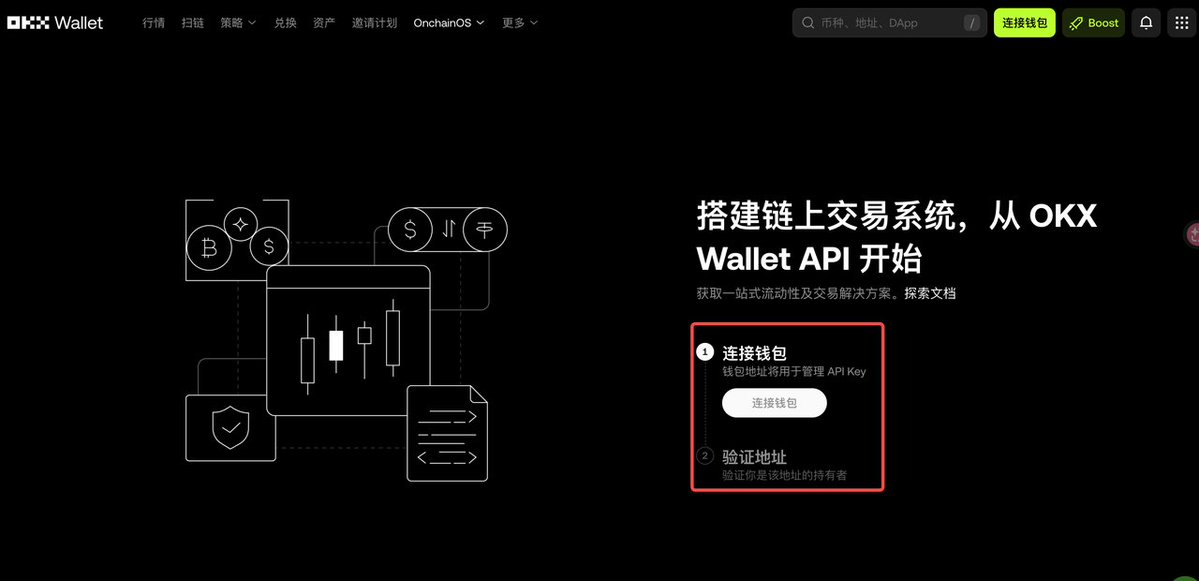
Step Two:
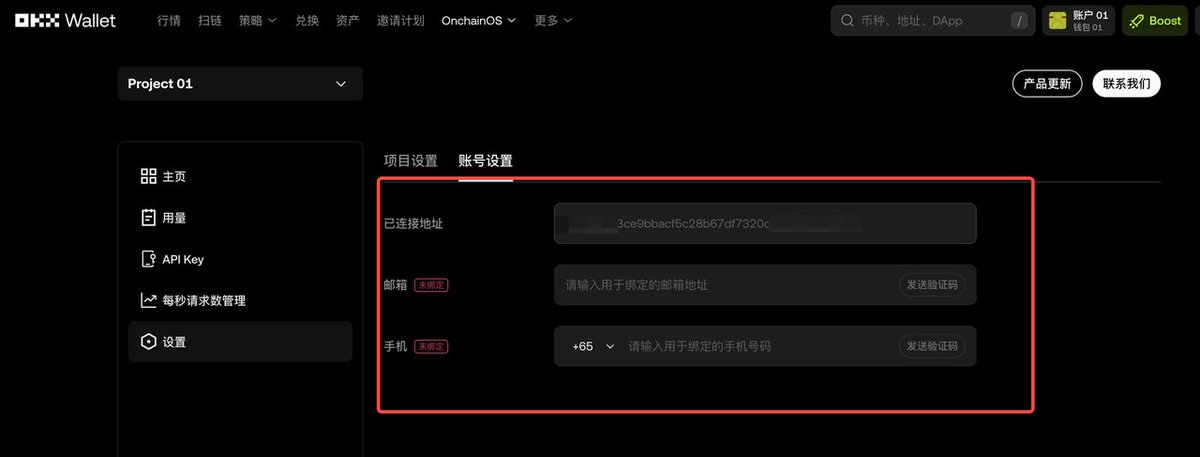
Connect your wallet and verify the wallet address
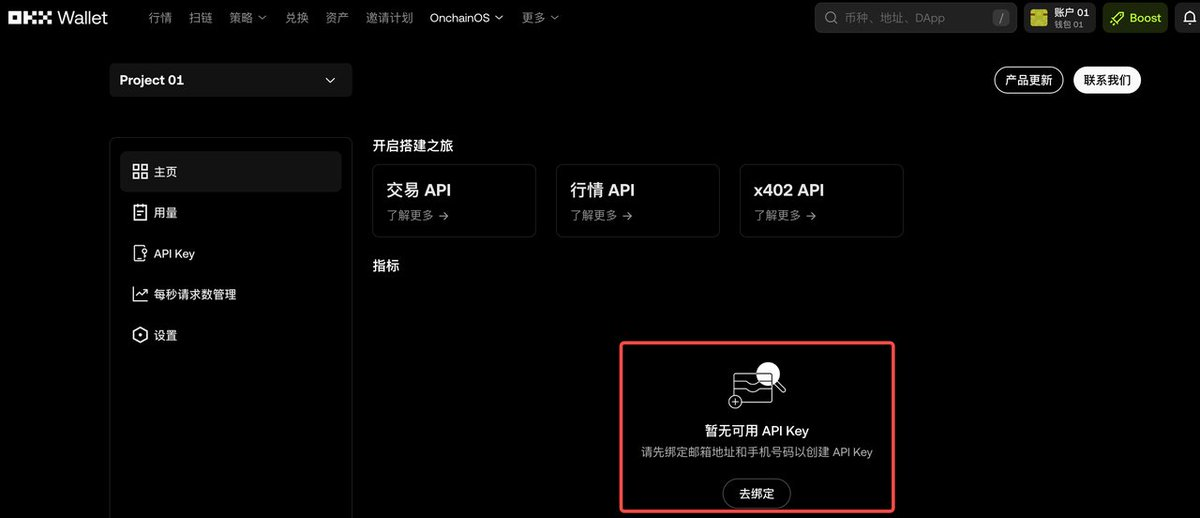
Step Three:
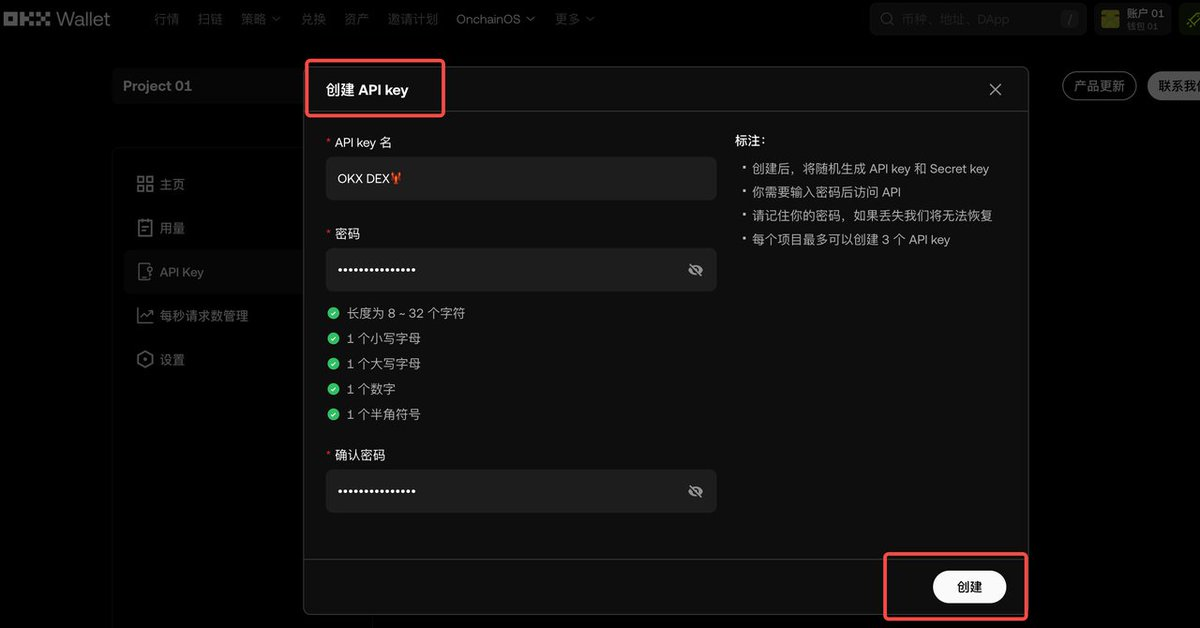
Bind your email address and phone number to create an API Key
Note: Please keep your API key safe when creating the API Key, and do not disclose it to anyone.
Step Four:
After creating it, tell your Agent the following content, and the Agent will create a file and open it, just paste your key into it:
Create a .env file containing the following variables: OKX_API_KEY, OKX_SECRET_KEY, and OKX_PASSPHRASE. Also, add .env to .gitignore. Open .env for me and tell me what the next step is and remind me to save the file.
Note: Do not expose key information in logs, screenshots, or chats
Step Five:
Open OpenClaw and add OnchainOS to your Agent
Choose any of the following access methods:
- Method A: Skills (Recommended)
Tell your Agent:
Install OnchainOS skills by running: npx skills add okx/onchainos-skills
The Agent will automatically install and remind you to restart. For more, see
https://github.com/okx/onchainos-skills
- Method B: MCP Server
Tell your Agent:
Add an MCP server named onchainos-mcp, with the following configuration:
URL is https://web3.okx.com/api/v1/onchainos-mcp;
Header is OK-ACCESS-KEY: "here add your okx-api-key". After finishing, remind me to restart the client.
🌳 You have now completed the installation process and can enter various commands for the Agent to call OKX OnchainOS Skills to perform operations and services, such as:
“Construct an exchange transaction: 100 USDT → OKB, wallet address 0xd8dA..., slippage 0.5%”
“Help me check the top 100 tokens by market cap on the X layer chain within 24 hours”
“Help me check which address holds the most xx tokens”
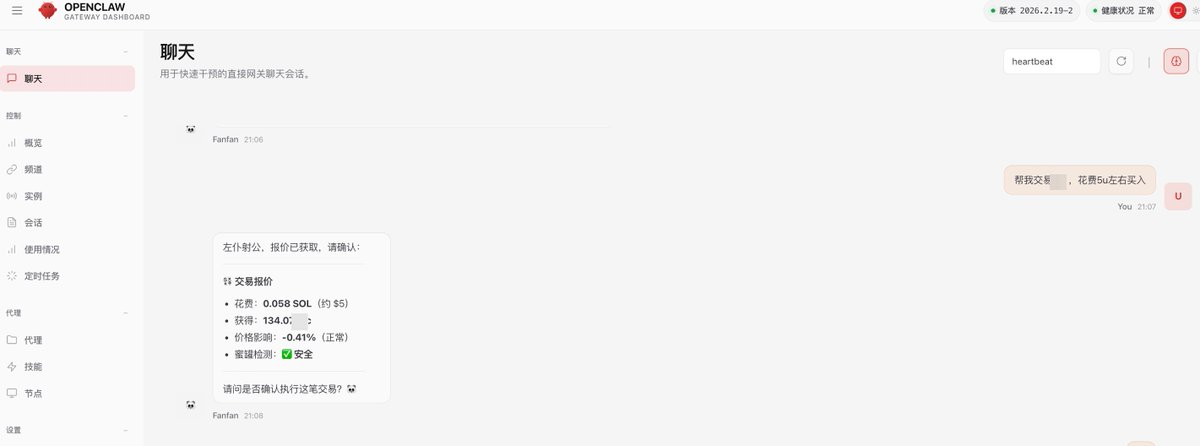
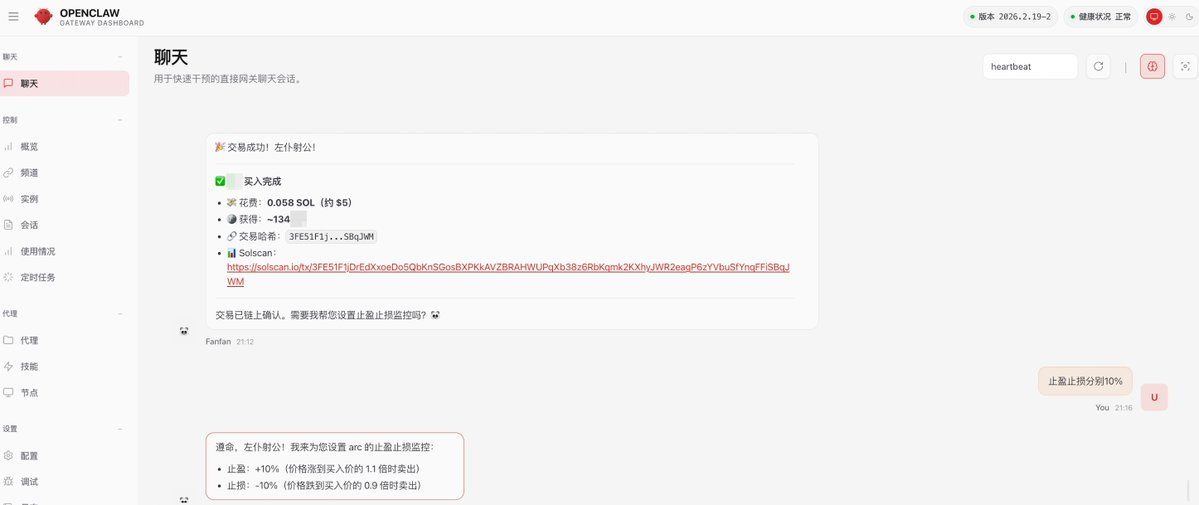
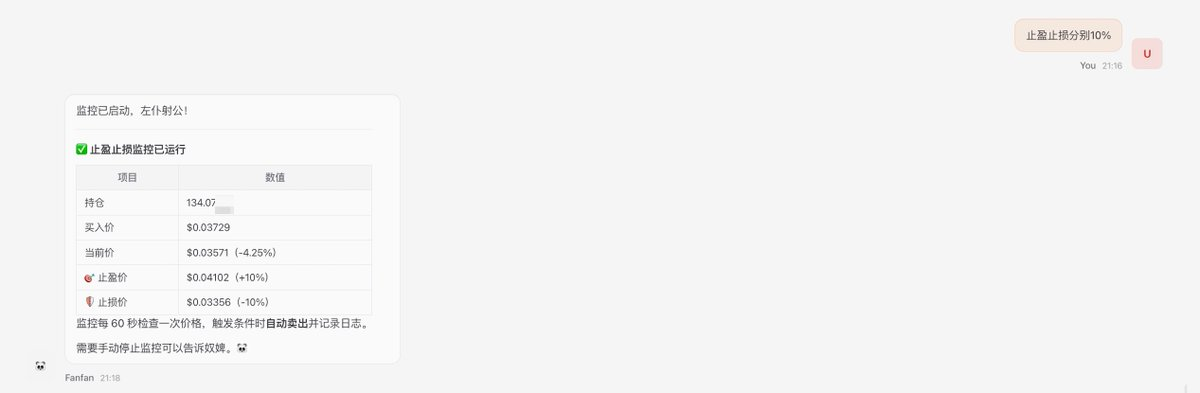
🌳 Below is the operating status after installation under various commands for trading, setting stop-loss take-profit, monitoring, etc.:
Conclusion: Embrace AI Native Web3, Starting with OKX OnchainOS!
The integration of AI and Web3 is opening a new era full of infinite possibilities. OKX OnchainOS is a pioneer of this new era, transforming your wallet from a mere asset storage tool into an intelligent partner capable of thinking, deciding, and executing. Now is the best time for you to experience the charm of AI native Web3!
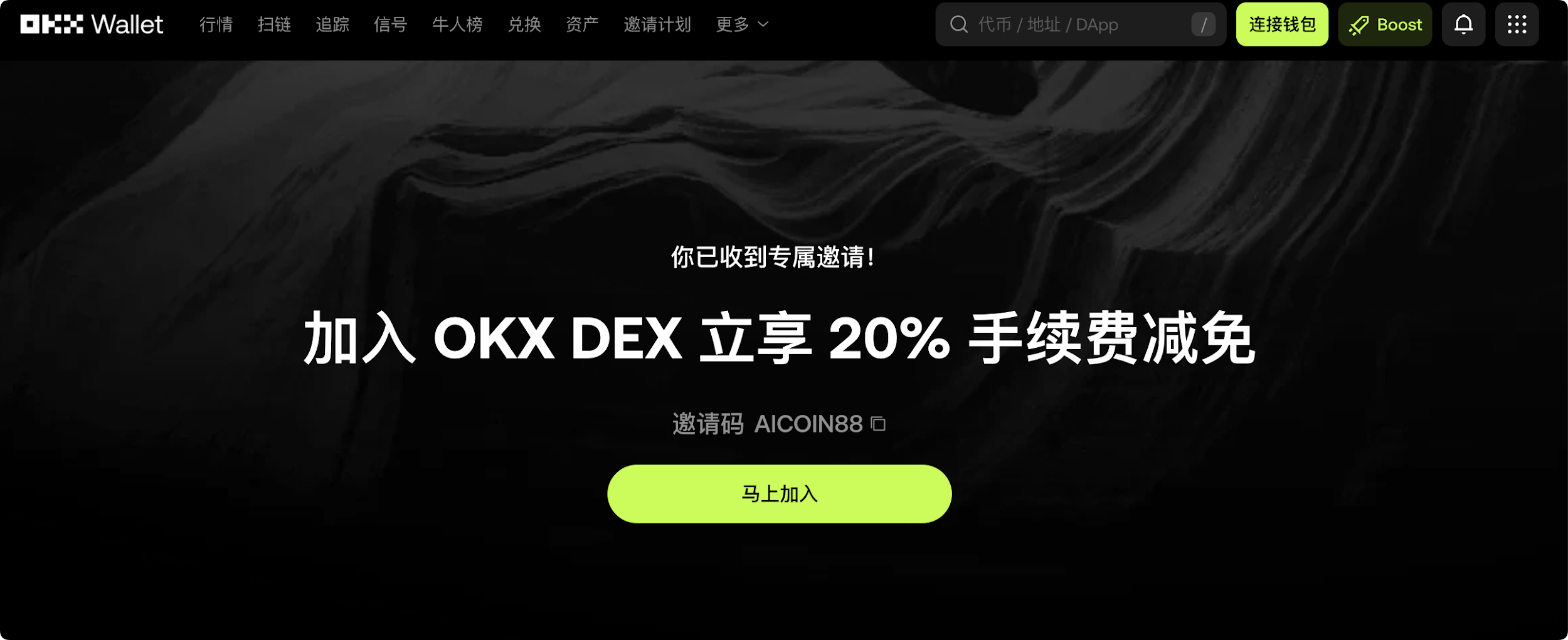
Exclusive Benefit: Immediately use the exclusive invitation code [AICOIN88] to register or bind the OKX wallet to enjoy up to 20% trading fee discounts!
In the era of high-frequency automated trading with AI, every fee saved will compound, bringing your AI Agent greater net profits!
Special Benefits Binding Invitation Code Tutorial:
Method One: Click the exclusive link below (your invitation code has been automatically filled in):
https://web3.okx.com/ul/joindex?ref=AICOIN88
During the wallet creation/import process, confirm that invitation code AICOIN88 has been bound.
Done! Start enjoying fee discounts immediately!
Method Two: OKX App Download Link:
https://static.rmgvx.com/upgradeapp/okx-android_aicoin20.apk
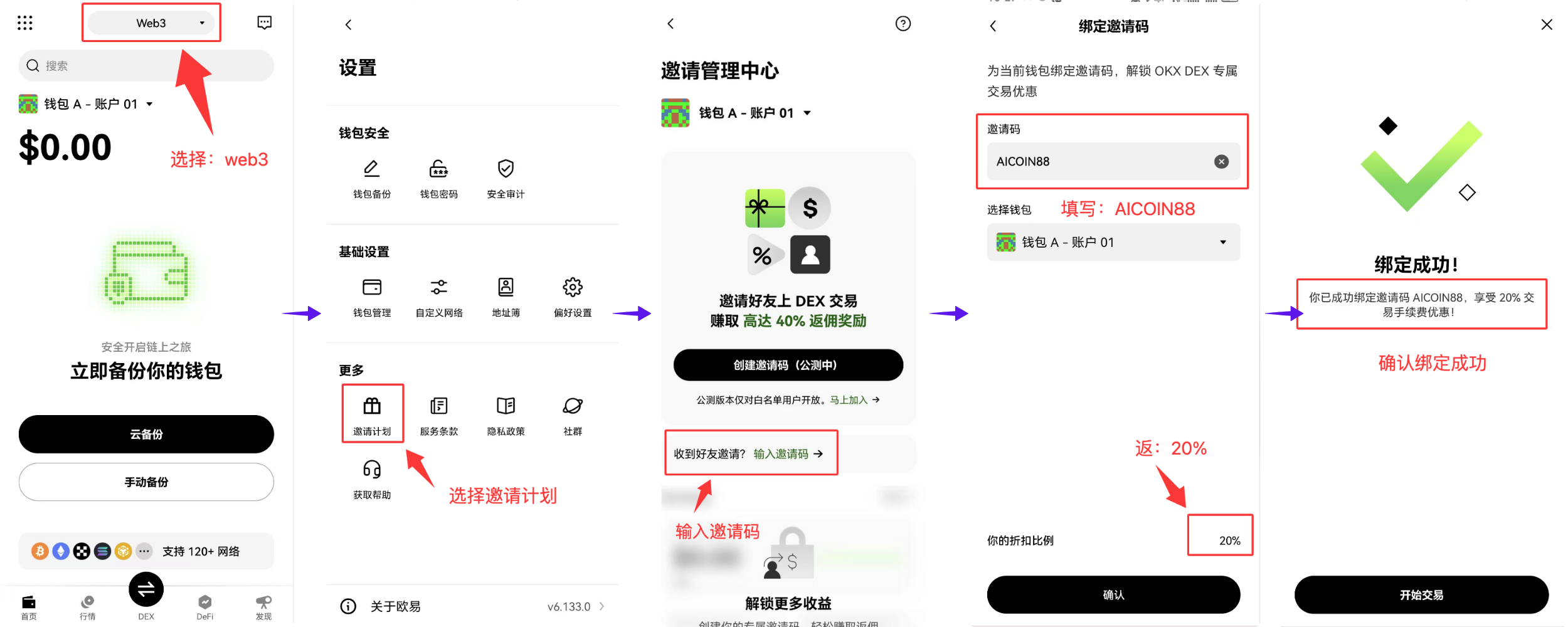
App Binding Invitation Code (AICOIN88) Method:
Summary and Call: Invitation Code is Money
Join our community to discuss and become stronger together!
Official Telegram community: t.me/aicoincn
AiCoin Chinese Twitter: https://x.com/AiCoinzh
20% Exclusive Fee Discount:
https://web3.okx.com/ul/joindex?ref=AICOIN88
OKX Benefit Group:
https://aicoin.com/link/chat?cid=l61eM4owQ
免责声明:本文章仅代表作者个人观点,不代表本平台的立场和观点。本文章仅供信息分享,不构成对任何人的任何投资建议。用户与作者之间的任何争议,与本平台无关。如网页中刊载的文章或图片涉及侵权,请提供相关的权利证明和身份证明发送邮件到support@aicoin.com,本平台相关工作人员将会进行核查。