GitHub is a great treasure, containing a vast number of useful tools.
However, the search function on the official website requires very precise keywords, which has long been inadequate.
So I researched how to find desired features in plain language (natural language), and after multiple practical tests, I arrived at the results below.
To illustrate the situation, the functionality I used as a case study is:
Help me find a project on GitHub that can assist me in AI writing, that can create viral content and take me to success.
1 GitHub Copilot
Recommendation Index: 2 stars
GitHub Copilot is the official AI chat tool. Next to the official search, click on the little person icon with glasses on his head to enter.
I originally had high expectations because it's official; they should be very familiar with their own product. However, the actual results were very disappointing.
Moreover, the free version can only use the GPT 5 mini model. I specifically created an account to get a pro version, which can use sonnet 4.6.
As a result, the first recommendation it gave was the novel project, which is an open-source text editor in the Notion style that can be used for AI writing.
2 GitHub MCP
Recommendation Index: 3 stars
I consulted AI (Gemini, Claude, GPT) about this issue, and the most recommended was GitHub MCP, which is officially developed by GitHub. It has many functions. Searching for projects is one of them. The results returned by MCP were quite good.
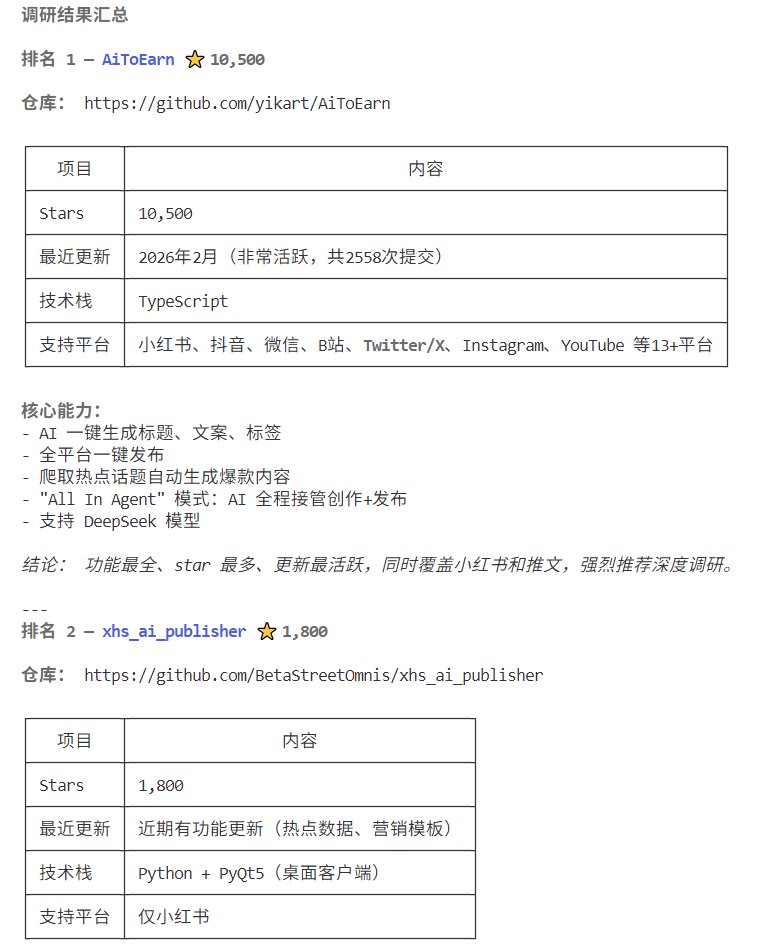
For example, regarding tools that can take me to success, it recommended AiToEarn.
However, my recommendation index is only 3 stars because its effectiveness is similar to the next two, but it is very complicated. Because it requires
1) Configuration of some MCP functions, because GitHub MCP has many features, and if installed directly, there are more than twenty tools, with about 59k prompts injected, which is not cost-effective. Thus, it is necessary to only install the searching feature of MCP.
2) Configuration of the GitHub authorization token.
Overall, the effect is acceptable, but it's quite cumbersome.
3 Claude Code
Recommendation Index: 5 stars
Using Claude Code directly was a pleasant surprise. I originally thought that specialized tools or skills would be easier to use. However, during the trial, Claude Code would always kindly ask, "Would you like me to help you with this?" So I just let it handle it.
I found the results to be excellent; it should be the best among the several solutions.
4 Gemini Web Version
Recommendation Index: 4 stars
Since Claude Code can search directly, I thought the Gemini web version might also be able to search directly. The results were quite good too, but overall it was slightly worse than Claude Code.
For example, regarding writing projects,
the first recommendation was also AiToEarn, but the subsequent recommended projects were generally of lower quality than Claude Code.
5 Perplexity
Recommendation Index: 2 stars
Perplexity is also an AI tool recommended, with a relatively high recommendation index. However, the actual results were not good. The projects it found for me could be said to be the worst among the various methods.
6 Other Websites
During my research, I also tested some AI-recommended websites specifically designed for searching features on GitHub. However, their effectiveness was quite poor, so I will not list them one by one.
免责声明:本文章仅代表作者个人观点,不代表本平台的立场和观点。本文章仅供信息分享,不构成对任何人的任何投资建议。用户与作者之间的任何争议,与本平台无关。如网页中刊载的文章或图片涉及侵权,请提供相关的权利证明和身份证明发送邮件到support@aicoin.com,本平台相关工作人员将会进行核查。


